

Reading time: 6 minutes
Immediate response
You can Check the 12V Ford Kuga PHEV battery with FORScan, but it's important to know that the software doesn't simply give a rating like "battery good" or "battery needs replacing." Instead, it allows you to read voltage, error codes, and the status of the electronic modules, helping you understand whether the problem is actually with the battery or the charging system.
This procedure is based on the diagnosis performed on our 2021 Ford Kuga Plug-in Hybrid, using a Vgate vLinker MC+ and FORScan.
What you will learn:
In this guide you will find out:
- when it is advisable to carry out a diagnosis with FORScan;
- how to connect OBD2 scanner correctly;
- which modules to check;
- which parameters to check;
- when you need to replace the battery;
- when to reset the BMS.
Index
When to Check Your Battery with FORScan
It is advisable to perform a diagnosis with FORScan if:
- Ford Kuga PHEV does not enter READY mode;
- the battery runs out frequently;
- an error message appears on the instrument panel;
- you just replaced the battery;
- you want to check that the charging system is working correctly.
Where is the OBD2 socket on the Ford Kuga PHEV?
The OBD2 socket on the Ford Kuga Plug-in Hybrid is located under the steering wheel, in the lower part of the driver's side dashboard.
Once the diagnostic scanner is connected, you can launch FORScan and read all the modules of the car.
On our 2021 Ford Kuga PHEV, the socket is easily accessible without removing any panels.
What is needed
To carry out the check we used:
- a Windows PC with FORScan;
- an interface Vgate vLinker MC+;
- a 2021 Ford Kuga Plug-in Hybrid;
- the ignition is on (ON mode).
There's no need to remove the battery. Simply connect a compatible OBD2 scanner to the vehicle's diagnostic port.

How to connect FORScan to the Ford Kuga PHEV
- Connect the Vgate to the OBD2 socket.
- Turn on the ignition without starting the engine.
- Open FORScan on your PC.
- Wait for the forms to be automatically recognized.
- Save an initial scan before performing any operations.
Suggestion: If FORScan does not detect all modules, check that the ignition is in ON mode and that the OBD2 interface is compatible with the software.

Which modules to check
During our diagnosis we mainly checked these modules:
| Module | Master control |
|---|---|
| PCM | Any engine errors |
| BdyCM | Power supply of the control units |
| PSCM | Electric power steering |
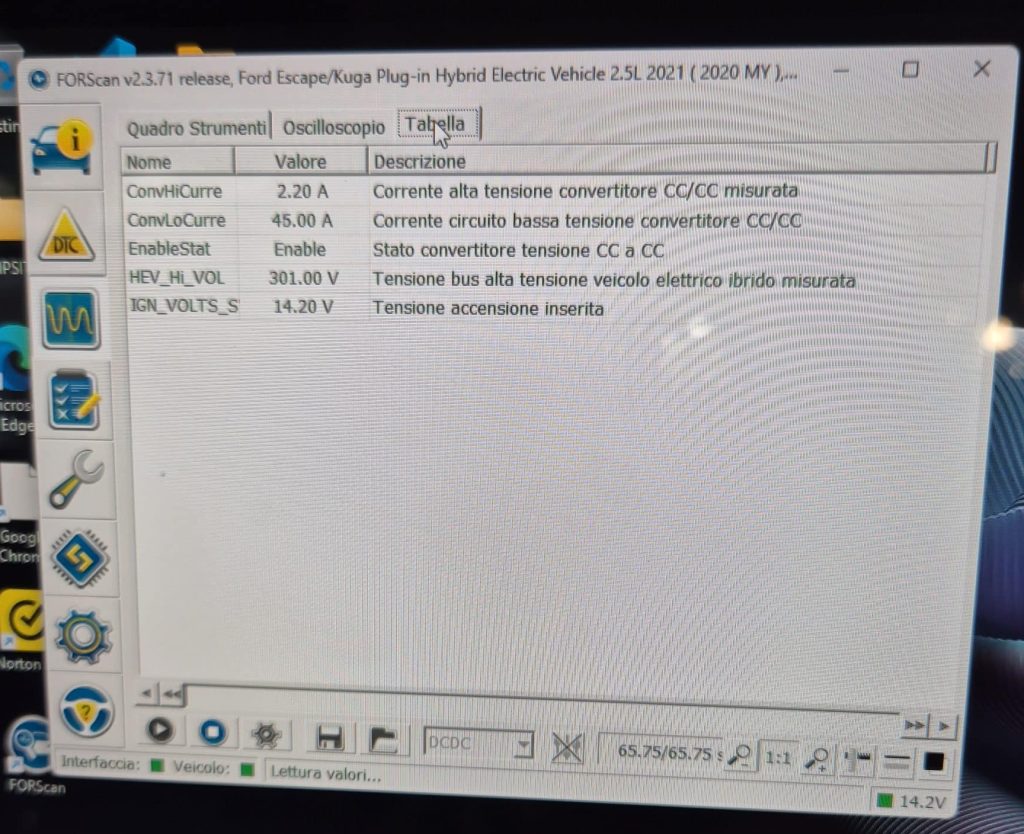
| DCDC | Charging the 12V battery |
These modules help to identify any anomalies that may affect the correct functioning of the 12V battery.
Among these, the DCDC module is one of the most important when you want to check the correct functioning of the 12V battery charging system.
This is the module we checked most carefully during our diagnosis.

What to check during diagnosis
Always check:
- any stored DTC codes;
- battery voltage;
- communication errors between modules;
- DC/DC converter operation;
- any anomalies recorded by the system.
What it doesn't mean
The presence of an error code does not automatically indicate a faulty battery. The data must be interpreted as a whole, also considering the state of the charging system and the vehicle.
What we checked on our Ford Kuga PHEV
During the diagnosis of our 2021 Ford Kuga Plug-in Hybrid we have:
- verified correct recognition of all modules;
- checked for any error codes;
- checked the operation of the DC/DC converter;
- performed BMS reset after battery replacement.
The photos and screenshots in this article were taken during this session.
No checks were performed for demonstration purposes only: all checks were carried out during the real diagnosis of our Ford Kuga PHEV.
When to reset the BMS
After replacing the battery it is advisable to perform the reset of the Battery Management System (BMS).
In our case we replaced the original 45 Ah battery with a 70 Ah Varta AGM A7/E39, immediately after performing a BMS reset via FORScan.
👉 Read also: Ford Kuga PHEV 12V battery replacement: AGM selection, installation, and BMS reset.

Vgate vLinker MC+
This is the OBD2 interface we used to perform all the diagnostics on the Ford Kuga PHEV with FORScan. It connects quickly and allows you to read the car's electronic modules.
Mistakes to avoid
- connect the scanner with a nearly completely flat battery;
- interpret a single parameter without analyzing the entire system;
- erase error codes before writing them down;
- replace the battery without a diagnosis;
- forget to reset the BMS after replacement.

FAQ - Frequently Asked Questions
Can FORScan tell if the battery needs replacing?
No. FORScan displays data and error codes that aid in diagnosis, but the final assessment requires interpretation of the collected information.
Which OBD2 interface is recommended?
For this guide we used the Vgate vLinker MC+, fully compatible with FORScan.
Do you need Internet to use FORScan?
No. An Internet connection is not required to diagnose your vehicle.
After changing the battery, is it necessary to reset the BMS?
Yes, it is recommended for the system to correctly recognize the new battery.
Can FORScan check battery health?
It can provide useful data for diagnosis, but it does not replace professional tools dedicated to battery testing.
In summary
Check the Ford Kuga PHEV 12V battery with FORScan It allows you to gather valuable information before deciding on a replacement. A properly performed diagnosis can avoid unnecessary expenses and help identify any problems with the charging system or electronic modules.
Conclusion
In our case, FORScan was a fundamental tool for analyzing the behavior of the 12V battery before and after replacement. Thanks to the data collected, we were able to verify the correct functioning of the modules, check the charging system, and correctly reset the BMS.
If yours Ford Kuga PHEV If your vehicle is having trouble starting or the battery is frequently discharging, starting with a diagnosis with FORScan is often the best way to determine whether the problem is really with the battery or another component of the electrical system.
👉 Read also: Why does the 12V battery on a Ford Kuga PHEV die? 7 things to check.
💬 If this guide was helpful to you, please share it with other owners. Ford Kuga PHEV. It could help them diagnose a 12V battery problem more quickly and avoid unnecessary replacement.
FORScan is not a replacement for a professional battery tester, but it is one of the best tools for determining whether the problem is actually with the battery or with the car's electrical system.


 Italian
  English